
 +1 (213) 581-5518
Blogs
Understanding Stitch Density in Embroidery Digitizing

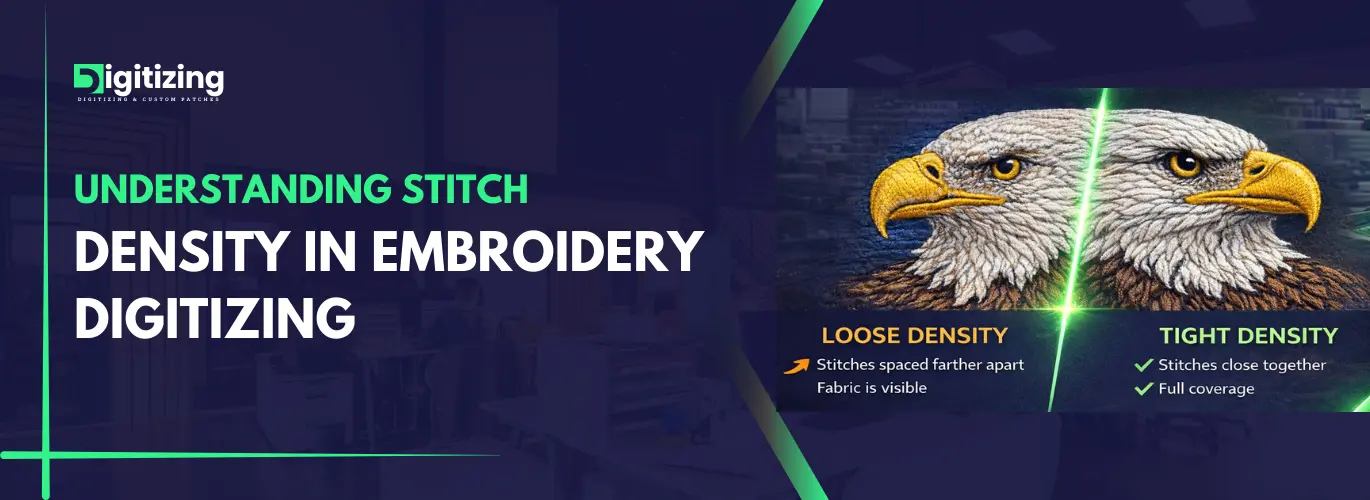
Welcome back, embroidery fans! Today, we are going to talk about stitch density. You have probably heard this term before, if you are familiar with embroidery digitizing. However, many people do not know how important it really is. Think of stitch density in embroidery digitizing as your secret weapon. In fact, it turns otherwise causal designs into something amazing. You might be making logos, text, or detailed art. And either way, getting the density right makes a huge difference in the final result. Too many stitches make your fabric stiff. As a result, it feels uncomfortable to wear. On the other hand, too few stitches make designs look thin and weak. It stays bright and fresh after many washes. Therefore, understanding this is not just helpful. But it is a must-know aspect for anyone doing embroidery digitizing. So, let’s break it down simply, so you can master it fast.
What Is Stitch Density?
First off, let’s define it. Stitch density means how many stitches fit in one area. Basically, you measure it in stitches per square inch or millimetre. Consequently, this number changes how your embroidery looks and feels. Most designs use spacing between 0.4 and 0.6 millimetres. In other words, that is about 4 to 6 stitches per millimetre. However, these numbers can change. And the stitch density in embroidery digitizing depends on your fabric, thread weight and stitch type.
Why Stitch Density Matters For A Professional Look
Now let’s see why this is so important. Honestly, stitch density in embroidery digitizing is not just a number. Rather, it is what makes quality embroidery work. It presents several benefits like:
- Sharp Looks: First of all, good density makes designs look crisp and clean. As a matter of fact, your logos and patterns stand out better.
- Stays Strong: Additionally, the right density helps embroidery last. Too few stitches fall apart after washing. On the flip side, too many stitches can damage soft fabrics.
- Feels Comfortable: Besides that, nobody wants scratchy embroidery. Good density keeps your work soft and nice to wear.
Saves Money: Furthermore, more stitches need more thread and time. Therefore, the right density keeps costs down without hurting the quality.
How Density Affects Your Work
The stitch density in embroidery digitizing changes many things in your project. In particular, here is what you need to know:
- Fabric Matters: Different fabrics need different density. For example, soft materials like silk will pucker if you use too many stitches. In contrast, heavy fabrics like denim can handle more. Even so, even denim looks lumpy if you go overboard.
- Thread Weight: Similarly, thick threads fill space faster. As a result, they need less density. Conversely, thin threads need more stitches to cover up well.
- Design Details: Likewise, small parts like tiny letters need light density. This keeps them visible and easy to read. On the other hand, big solid areas need more stitches for a smooth look.
Interestingly, research shows bad density can stress light fabrics by 20%. So, getting it right matters a lot for a professional look.
Best Density for Each Fabric
Every fabric is different. Accordingly, here is what works best for stitch density in embroidery digitizing:
- Cotton: First, use standard density of 0.4 to 0.5 mm spacing. As it turns out, this works great for t-shirts and polos.
- Leather: Next, go easy with 0.6 to 0.8 mm spacing. Also, use simple designs so leather does not crack.
- Silk and Satin: In addition, keep it light at 0.6 to 0.7 mm. Plus, add underlay stitches for support.
- Denim: Moreover, this tough fabric handles 0.3 to 0.4 mm spacing. Just do not make it too heavy.
- Fleece: Finally, use medium density of 0.5 to 0.6 mm. Then add light underlay, so stitches do not sink in.
- Pro Tip: Above all, always test on scrap fabric first. This saves you from mistakes.
How to Control Stitch Density In Embroidery
Now, let’s talk about using your software. Here is how to get the perfect stitch density:
- Adjust Settings: To begin with, programs like Wilcom or Hatch; let you set exact spacing. Start with defaults, then change them for your needs.
- Use Underlay: In the same way, these base stitches give great support. Thus, you need fewer top stitches.
- Layer Smart: At the same time, in complex designs, use less density where parts overlap. This keeps things smooth and classy.
- Test First: Most importantly, always make a sample stitch. What looks good on screen can work differently on real fabric.
Software Tips for Better Control
Understanding your digitizing software features helps achieve better stitch density control. Most professional programs offer automatic density adjustment tools that can save time while maintaining quality.
Setting Density for Different Designs
Each design type needs its own approach:
- Logos: To start, use medium density of 0.4 to 0.5 mm for clean lines. In addition to that, add underlay for stretchy fabrics.
- Text: Similarly, small text under 0.2 inches needs low density of 0.6 to 0.8 mm. Furthermore, use satin stitches to keep it clear.
- Detailed Art: Meanwhile, mix your density levels. Use more for big areas and less for small details. At the same time, keep underlay light for flex.
Here is an example to illustrate. A cap logo might use 0.5 mm for the main part. However, switch to 0.7 mm for small text. This keeps everything clear.
Design-Specific Density Guidelines
Small logos need different treatment than large designs. Adjust your approach based on the final size and placement of your embroidery work.
Mistakes to Avoid
Even pros can make these errors. Fortunately, they are easy to fix:
- Too Many Stitches: First of all, this causes puckering and fabric damage. Instead, cut density by 10 to 15 percent. Then add good underlay.
- Same Density Everywhere: In the same vein, using one setting for silk and denim causes problems. Therefore, always make changes based on your fabric type.
- No Testing: Equally important, designs that look perfect on screen often need changes on fabric. So, always stitch test samples.
- Crowding Small Parts: Lastly, high density makes tiny elements look fuzzy. Rather, make these areas simpler. Then use wider spacing of 0.6 to 0.8 mm.
Conclusion
Understanding stitch density in embroidery digitizing seems minor at first. Nevertheless, it is one of the biggest factors in embroidery digitizing. When you learn how density affects fabric, thread and design; you can create beautiful work of art that lasts. You might be making logos, working with leather, or doing cotton t-shirts. In any case, good density makes all the difference. So, open your software and adjust those settings. Start making embroidery that really stands out. With practice, you will get better fast. Eventually, you will produce professional work that makes clients happy. Remember that mastering this takes time and patience. In spite of that, the results are worth it. Keep testing and learning with Digitizing.us.com! Soon enough, you will know what works best in every case.